

Migrate User Profile My Links
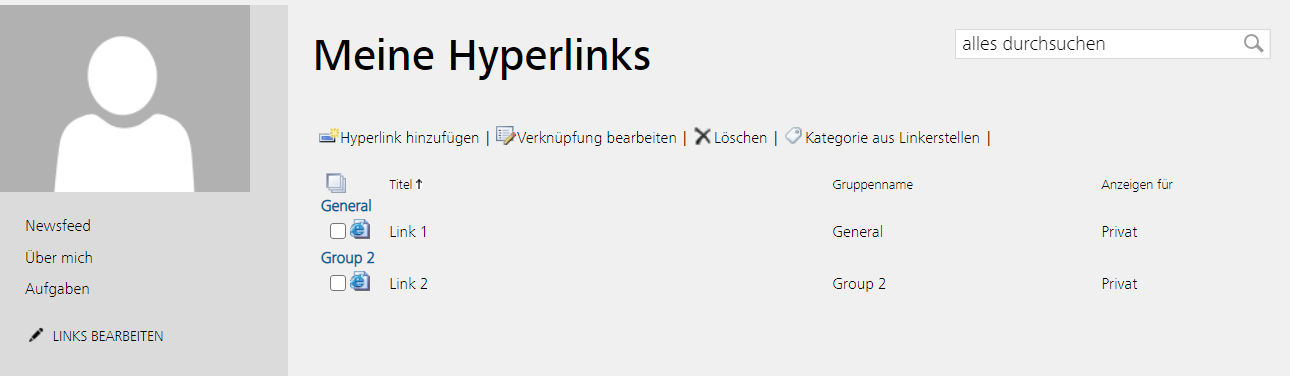
SharePoint users can store favorite links directly inside the mysite. If you like to migrate to another SharePoint version or different server maybe you like to transfer these links without copy the database. In general these links are stored in the ProfileDB of your server. There is a smart article about this from Vinods source.
Here a small sample, where you can edit links:

Solution
I wrote a improved script to import and export the data via xml. For export we use the profile manager to get the data and collect for every user all links.
1$profileManager = Get-UserProfileManager2$profiles = $profileManager.GetEnumerator()3$all = $profileManager.Count4$collection = @()5$num = 06foreach ($profile in $profiles) {7 $userProfile = $profileManager.GetUserProfile($profile.AccountName);8 foreach ($link in $userProfile.QuickLinks.GetItems() ) {9 $myLink = [PSCustomObject]@{10 AccountName = $profile.AccountName11 Title = $link.Title12 Url = $link.Url13 Group = $link.Group14 PrivacyLevel = $link.PrivacyLevel15 ID = $link.ID16 }17 $collection += $myLink18 }19 $num ++20 if (0 -eq ($num % 1000)) {21 Write-Host "User profiles collected $num / $all" -ForegroundColor Gray22 }23}
On the import site we need only recreate this link
1$profileManager = Get-UserProfileManager2$userProfile = $profileManager.GetUserProfile($link.AccountName);3$userProfile.QuickLinks.Create($link.Title, $link.Url, "UserSpecified", $link.Group, $link.PrivacyLevel) | Out-Null
Full script:
1Add-PSSnapin Microsoft.SharePoint.PowerShell -ErrorAction SilentlyContinue23Function Export-UserProfileLinks($filePath) {4 Try {5 Write-Host "Enter Export-UserProfileLinks"6 $list = Get-UserProfileLinks7 #convert to xml8 $xmlBackup = $list | ConvertTo-FullXML -ObjectName "Link" -RootNodeName "Links"9 #write file10 $xmlBackup | Out-File -FilePath $filePath11 }12 Catch {13 throw $_.Exception.Message14 }15 Write-Host "Leave Export-UserProfileLinks"16}17Function Import-UserProfileLinks($configFilePath) {18 Try {19 Write-Host "Enter Import-UserProfileLinks"20 [xml] $configXml = Get-Content $configFilePath -Encoding UTF821 foreach ($link in $configXml.UserProfileLinks.UserProfileLink) {22 Edit-UserProfileLink $link23 }24 }25 Catch {26 throw $_.Exception.Message27 }28 Write-Host "Leave Import-UserProfileLinks"29}30Function Get-UserProfileLinks() {31 $profileManager = Get-UserProfileManager32 $profiles = $profileManager.GetEnumerator()33 $all = $profileManager.Count34 $collection = @()35 $num = 036 foreach ($profile in $profiles) {37 $userProfile = $profileManager.GetUserProfile($profile.AccountName);38 foreach ($link in $userProfile.QuickLinks.GetItems() ) {39 $myLink = [PSCustomObject]@{40 AccountName = $profile.AccountName41 Title = $link.Title42 Url = $link.Url43 Group = $link.Group44 PrivacyLevel = $link.PrivacyLevel45 ID = $link.ID46 }47 $collection += $myLink48 }49 $num ++50 if (0 -eq ($num % 1000)) {51 Write-Host "User profiles collected $num / $all" -ForegroundColor Gray52 }53 }54 Write-Host "User profiles $num collected"55 return $collection56}57function Edit-UserProfileLink($link) {58 Try {59 $profileManager = Get-UserProfileManager60 $userProfile = $profileManager.GetUserProfile($link.AccountName);61 $userProfile.QuickLinks.Create($link.Title, $link.Url, "UserSpecified", $link.Group, $link.PrivacyLevel) | Out-Null62 }63 Catch {64 Write-Host "$($link.AccountName) cannot import $($link.Title)" -ForegroundColor DarkYellow65 }66}67function Get-UserProfileManager() {68 $caURL = (Get-SPWebApplication -IncludeCentralAdministration | Where-Object -FilterScript {69 $_.IsAdministrationWebApplication -eq $true70 }).Url71 $serviceContext = Get-SPServiceContext -Site $caURL72 return New-Object Microsoft.Office.Server.UserProfiles.UserProfileManager($serviceContext);73}74function ConvertTo-FullXML {75 [CmdletBinding()]76 param (77 #Object to Input78 [Parameter(ValueFromPipeline)]$InputObject,79 #Name of the root document node. Defaults to "Objects"80 $RootNodeName = "Config",81 $ObjectName = $null82 )83 begin {84 [xml]$Doc = New-Object System.Xml.XmlDocument85 #Add XML Declaration86 $null = $doc.AppendChild($doc.CreateXmlDeclaration("1.0", "UTF-8", $null))87 #Add XML Root Node88 $root = $doc.AppendChild($doc.CreateElement($RootNodeName))89 }90 process {91 if ($null -eq $ObjectName) {92 $elementname = $InputObject.gettype().name93 }94 else {95 $elementname = $ObjectName96 }97 $childObject = $doc.CreateElement($elementname)98 foreach ($propItem in $InputObject.psobject.properties) {99 $propNode = $doc.CreateElement($propItem.Name)100 $propNode.InnerText = $propItem.Value101 $null = $childObject.AppendChild($propNode)102 }103 $null = $root.AppendChild($childObject)104 }105 end {106 return $doc.outerxml107 }108}
To run with on export server
$file = "c:\temp\profilelinks.xml"
Export-UserProfileLinks $file
And recreate it on import server
$file = "c:\temp\profilelinks.xml"
Import-UserProfileLinks $file
Addition
I like to mention there are also some solution to display these links in modern ui sample or sample 2